
FreeClimb Audio Streaming
Understand what Audio Streaming is, how it works, and when to use it to build smarter, faster voice applications with FreeClimb.
At a glance
FreeClimb supports real-time, bidirectional audio streaming between active calls and external application servers over WebSocket connections. This architecture enables developers to integrate advanced third-party AI services, live sentiment analysis engines, or real-time transcription systems into their telephony workflows.
What is real-time call audio streaming in FreeClimb?
Audio Streaming gives your application direct, real-time access to call audio by establishing a persistent gRPC connection with FreeClimb. Unlike traditional FreeClimb workflows that rely on PerCL commands or REST APIs, Audio Streaming uses a different interaction model. Once active, your app communicates directly with the audio stream, and no further PerCL commands are exchanged.
This approach is designed for advanced voice applications that require low latency, continuous audio exchange, and greater control over how audio is processed.
How real-time audio streaming works in FreeClimb
When a call is connected to your FreeClimb application, you can use a PerCL command to initiate Audio Streaming. This command instructs FreeClimb to establish a bidirectional gRPC stream with your application.
Once the stream is active, FreeClimb begins sending audio packets to your gRPC server, and your application has the option to respond with audio as well. This direct channel replaces the usual PerCL-based flow and no further commands are issued from FreeClimb during the streaming session.
Your application is now in full control of the audio interaction. It is responsible for handling incoming audio, managing any outbound responses, and following the requirements defined in the FreeClimb gRPC specification.
Call flow sequence for FreeClimb gRPC audio streaming
This call flow diagram demonstrates the execution lifecycle of a real-time gRPC audio streaming session in FreeClimb. Upon receiving an inbound SIP call, FreeClimb issues a web request to your server, which responds with a streaming PerCL command. FreeClimb then opens a low-latency, persistent bidirectional gRPC connection directly to your streaming server for continuous real-time audio exchange until the session terminates.
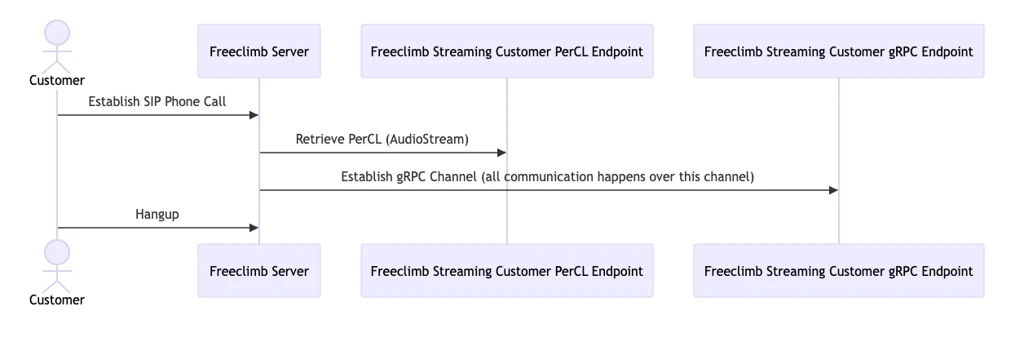
- A customer places a SIP call.
- FreeClimb receives the call and sends a PerCL request.
- Your application responds with PerCL that starts audio streaming.
- FreeClimb establishes a gRPC connection with your application.
- Audio is streamed in real time between FreeClimb and your server.
- The connection is maintained until the call ends or streaming is stopped.
When to use audio streaming over traditional PerCL commands in FreeClimb
Audio Streaming is designed for scenarios where your application needs continuous, real-time access to call audio. It bypasses the traditional PerCL model and hands control of the audio flow directly to your system.
It’s a good fit when:
- Your application requires low-latency audio processing.
- You need full control over how audio is received, interpreted, or responded to.
- You want to maintain a persistent, bidirectional connection throughout the call.
What are the technical prerequisites for implementing FreeClimb audio streaming?
Before using Audio Streaming, make sure your application is prepared for the following:
- It must run a gRPC-compatible server that implements the FreeClimb Audio Streaming protocol.
- Once streaming begins, PerCL command flow is paused, and your app becomes fully responsible for audio handling.
- The connection must be bidirectional and responsive to avoid dropped sessions or delays.
- Security and performance tuning are essential for production environments.
Updated about 2 months ago